A gaming room isn’t just a PC in a corner anymore. Whether you’re into competitive FPS, cozy sims, retro consoles, or VR, your setup affects performance, immersion, and how long you can actually play without a headache or backache.

The ultimate gaming room balances 3 things: performance tech, ergonomic comfort, and vibe. Cable spaghetti, glare on your monitor, and a dining chair will ruin even a 4090 build. These 24 ideas cover layout, lighting, sound, storage, and style so you can game longer, better, and in a room you actually like looking at.

Layout & Desk Setup: Function First

1. The Command Center L-Shaped Desk
The look: L-shaped or corner desk with PC on one side, console/streaming gear on the other.
Why it works: Separates tasks. PC gaming side = keyboard/mouse space. Second side = controller, mixer, or handheld charging. You don’t have to move stuff constantly.
Get the look: IKEA Karlby + Alex drawers is the classic. Make sure it’s 30” deep minimum. 25” feels cramped with a 27”+ monitor.

2. Wall-Mount Your Monitors
The look: 1–3 monitors on gas-spring arms, no stand on desk.
Why it works: Frees massive desk space for keyboard, mouse pad, and snacks. Adjust height to eye level so you’re not craning your neck.
Get the look: Single monitor: center at eye level, 20–30” from face. Dual: primary straight, secondary angled 30°. Triple: slight curve. VESA mounts are cheap and worth it.

3. Put Your PC on the Desk or Pedestal, Not the Floor
The look: PC on desk or small pedestal next to it. Tempered glass side facing you.
Why it works: Less dust intake than floor. You see your RGB investment. Easier to access ports.
Get the look: If desk space is tight, use a 12” CPU stand with wheels. Keep 4” clearance around vents.

4. Cable Management Is Non-Negotiable
The look: Zero cables visible. All routed under desk in trays, sleeves, or raceways.
Why it works: Cable mess = visual noise = stress. Clean setup feels pro and makes cleaning easier.
Get the look: Under-desk tray + J-channel + Velcro ties. Label both ends of cables. Mount power strip under desk. 2-hour project that changes everything.

5. Plan for Console + PC Hybrid
The look: HDMI switch or receiver so PS5, Xbox, Switch, and PC all run to same monitor/TV.
Why it works: No swapping cables behind desk. One button = switch platforms.
Get the look: 4K120 HDMI 2.1 switch with remote. Run a single HDMI from switch to monitor. Console shelf under desk or in media unit.

Ergonomics: Game Longer Without Pain

6. Buy a Real Chair, Not a “Gaming” Chair
The look: Ergonomic mesh office chair like Herman Miller, Steelcase, or Secretlab Titan if you must.
Why it works: Most “gaming” chairs are bucket seats with bad lumbar. 6-hour sessions need lumbar, adjustable arms, and tilt.
Get the look: Key features: adjustable lumbar, 4D arms, seat depth, headrest. Try before buying. Your back will thank you.

7. Desk Height = Elbows at 90°
The look: Desk 28–30” tall, or adjustable standing desk.
Why it works: Wrong height causes wrist and shoulder pain. Standard desks are built for 5’10” men.
Get the look: Test: sit, arms at side, bend elbow 90°. Keyboard should be at fingertip height. Use a footrest if feet dangle.

8. Monitor Height: Top Third at Eye Level
The look: Top of screen at or just below eye level when sitting straight.
Why it works: Looking down strains neck. Looking up strains eyes. Neutral = longer sessions.
Get the look: Stack books under monitor to test before buying arm. Phone books still exist for this.

9. Footrest Under Desk
The look: Angled footrest or small ottoman under desk.
Why it works: Takes pressure off lower back and improves circulation. Stops you from crossing legs.
Get the look: $25 from Amazon. Or use a box short-term to test height.

Lighting: Kill Glare, Set Mood

10. Bias Lighting Behind Monitors
The look: LED strip on back of monitor casting glow on wall. 6500K for color accuracy, 2700K for cozy.
Why it works: Reduces eye strain by lowering contrast between bright screen and dark room. Makes blacks look deeper.
Get the look: USB-powered strip from monitor. Don’t do rainbow — use solid white or warm. Set to 10–15% brightness.

11. No Overheads While Gaming
The look: Overhead off. Desk lamp, floor lamp, and bias lighting only.
Why it works: Overhead causes glare on screen and washes out colors. Side lighting = control.
Get the look: Put all lights on smart plugs. “Alexa, game mode” = bias + lamp on, overhead off.

12. RGB, But With Restraint
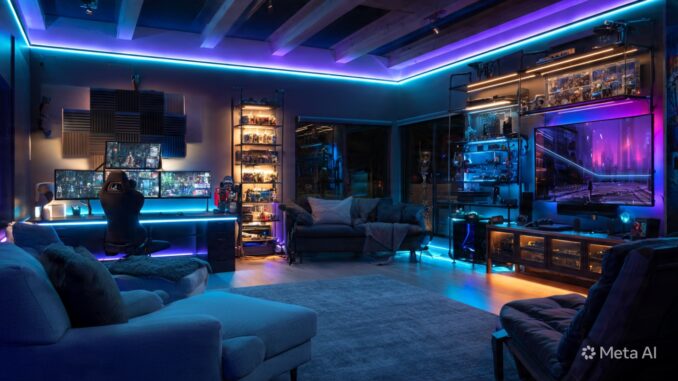
The look: 1–2 accent colors max. Under desk, behind monitor, or in PC case. Not all at once.
Why it works: Full rainbow disco is distracting and dates fast. Subtle glow = immersive.
Get the look: Match RGB to game genre — blue for sci-fi, orange for survival. Use static color vs cycling.

13. Blackout Curtains for Day Gaming
The look: 100% blackout curtains or shades.
Why it works: Sun glare ruins visibility and washes out screens. Pro players game in caves for a reason.
Get the look: Hang curtains 4–6” above window and 8” past sides. Combine with bias lighting so room isn’t pitch black.

Sound & Acoustics

14. Treat First Reflections for Audio
The look: Acoustic panels at ear level on side walls, maybe behind you.
Why it works: Cuts echo and muddiness. You hear footsteps clearer. Mic sounds better for stream/chat.
Get the look: 2” thick panels at mirror points. Cheap DIY: Owens Corning 703 wrapped in fabric. Or go art — panels printed with art.

15. Headphone Stand with DAC/Amp
The look: Dedicated stand on desk + external DAC/amp for audiophile headphones.
Why it works: Better sound stage for FPS. Gets headset off desk. Reduces clutter.
Get the look: Schiit Stack or FiiO for budget. Hang stand under desk to save space.

16. Soundproof If You Stream or Rage
The look: Weatherstripping on door, thick rug, heavy curtains.
Why it works: Keeps your mic from picking up house noise and keeps you from annoying house.
Get the look: Door sweep + acoustic door seal kit = $40 and huge difference. Rug + curtains absorb sound.

Display & Immersion

17. Ultrawide or Super Ultrawide for PC
The look: 34” 21:9 or 49” 32:9 monitor as main.
Why it works: More FOV in sims, FPS, and RPGs. One screen, no bezels. Insane immersion.
Get the look: 3440x1440 144Hz+ is sweet spot. 49” needs deep desk — 30”+ minimum.

18. OLED TV for Console Gaming
The look: 55–65” LG C3 or S95C on wall. PC/console split setup.
Why it works: OLED = true blacks, instant response. Console games are mastered for TV.
Get the look: Mount at eye level when seated. Viewing distance = 1–1.5x screen size. 65” = 5.5–8ft back.

19. Surround or Atmos Setup
The look: 5.1.2 or 7.1.4 speaker layout. Or quality soundbar with rears.
Why it works: Positional audio is cheat code for FPS. Story games feel cinematic.
Get the look: Start with 3.1, add rears later. Front LCR at ear height, rears slightly above. Atmos ceiling or up-firing.

20. Sim Racing/Flight Rig Zone
The look: Dedicated corner with wheel/pedal rig or HOTAS chair, separate from desk.
Why it works: You’re not moving gear on/off desk every time. Stays set up and calibrated.
Get the look: 80/20 rig for future-proofing. But a Playseat Challenge folds away if space is tight.

Style & Personality

21. Display Your Games/Collectibles, Don’t Hide Them
The look: IKEA Kallax or floating shelves with games spine-out, figures in acrylic cases.
Why it works: Your collection is decor. It’s personal and sparks convo.
Get the look: Use risers and vary height. LED strip in shelf = museum look. Dust weekly or use cases.

22. Themed, But Subtle
The look: Cyberpunk = neon + black + grid. Cozy = wood + plants + warm light. Not “Mario wall decal.”
Why it works: Heavy themes age fast. Vibe over franchise. You can like Zelda without Triforce lamps everywhere.
Get the look: Pick 1 mood board. 3 colors, 3 textures. Apply everywhere. Restraint = timeless.

23. Pegboard for Gear and Art
The look: Large pegboard above desk holding headphones, controllers, small shelves, and art.
Why it works: Storage + display + reconfigurable. Keeps desk clear.
Get the look: IKEA Skadis. Spray paint it to match room. 3D-print or buy accessories.

24. Plants for Air and Vibe
The look: Snake plant, pothos, or ZZ plant in corner. Not fake.
Why it works: Life in the room. Absorbs CO2, looks good on stream, breaks up tech.
Get the look: Low-light plants only. If you kill plants, fake is better than dead. But try — snake plants are immortal.

Gaming Room Essentials Checklist

Before you buy RGB:
-
Chair: Ergonomic, adjustable. Budget $300+.
-
Desk: 30” deep, correct height.
-
Monitor position: Eye level, arm’s length.
-
Lighting: Bias + lamp, no overhead, no glare.
-
Cables: Managed.
-
Sound: Headphones or speakers at ear level.
-
Internet: Ethernet, not WiFi. Always.
-
Air: Fan or AC. Hot room = throttled PC + sweaty you.
What to Avoid
-
LED everything: Your room isn’t a club.
-
Glass desk: Shows cables, cold on wrists, wobbles.
-
Tiny mousepad: Get XXL. 36” wide minimum for low DPI.
-
Speakers on desk: Vibrates. Use stands or mount.
-
No rug: Hard floors echo and feel cold. Add rug + pad.
Budget Tiers

$500 Upgrade: Monitor arm + bias light + cable tray + ergonomic chair from Staples + XXL mousepad.
$2000 Upgrade: Electric desk + ultrawide + acoustic panels + DAC/amp + OLED.
$5000+: Full room: custom desk, 49” OLED, Atmos, sim rig, acoustic treatment.

The ultimate setup isn’t about money. It’s about intention. Fix glare, fix your chair, hide cables, and add one personal touch. Everything else is bonus.

Build for how you actually play. If you’re 90% PC, don’t waste money on a 77” TV. If you’re couch co-op, prioritize comfy seating over desk RGB. Performance > aesthetics, but both > nothing.

Now go frag.
Leave a Reply